
1. Overview
DataOps Suite is a data validation and data processing platform consisting of DataOpsServer, DataOpsEngine, and DataOpsRepository. When deployed on Amazon EKS, these components run as containerized workloads within a dedicated Kubernetes namespace. Amazon EKS provides compute, orchestration, scalability, and availability for the platform.
2. DataOps Suite Components
2.1 DataOpsServer
DataOpsServer is the application and orchestration layer of DataOps Suite. It is responsible for:
- Providing the application interface and APIs.
- Orchestrating services within DataOps Suite.
- Managing application-level operations.
- Initiating and managing data processing operations.
- Communicating with DataOpsEngine.
- Communicating with the DataOps Repository.
- Managing connectivity and configuration for supported data sources.
DataOpsServer is deployed as a containerized workload in the EKS cluster.
2.2 DataOpsEngine
DataOpsEngine is the Spark-based data processing component. It performs computationally intensive operations required for data validation and processing.
- Executing data processing operations.
- Executing data validation and data quality workloads.
- Processing large volumes of data.
- Coordinating Spark processing workloads.
- Working with Spark executor/worker pods when deployed in cluster mode.
DataOpsEngine supports two deployment modes:
Standalone Mode
DataOpsEngine can run as a standalone processing engine when the workload does not require a distributed Spark cluster.
Cluster Mode
For larger workloads, DataOpsEngine can operate as a Spark cluster. Executor pods can be created and scaled according to processing workload, allowing the compute-intensive processing layer to scale independently from the application layer.
2.3 DataOpsRepository
DataOpsRepository is the PostgreSQL-based metadata repository for DataOps Suite. It stores application metadata required for the application to operate. For AWS deployments, the recommended architecture is to host the repository using Amazon RDS for PostgreSQL, keeping application metadata independent from the lifecycle of Kubernetes pods.
3. EKS Namespace Isolation
All DataOps components should be deployed into a dedicated Kubernetes namespace. A dedicated namespace provides logical isolation between DataOps and other applications running in the same EKS cluster.
4. Dedicated EKS Node Groups
Dedicated node groups are recommended because DataOps workloads—particularly Spark processing—can consume significant CPU, memory, disk, network, and I/O resources. Separating workloads helps prevent resource-intensive DataOps jobs from affecting unrelated applications.
Node Group | Primary Workload | Purpose |
DataOpsServer Node Group | DataOpsServer | Application/orchestration services |
DataOpsEngine Node Group | DataOpsEngine | Spark engine/master/driver |
Executor Node Group | Spark Executors | Heavy data processing workloads |
Kubernetes scheduling rules such as node labels, taints, and tolerations can be used to ensure workloads are scheduled onto their intended node groups.
5. Resource Isolation Rationale
If DataOpsServer and Spark executors run on the same nodes, heavy Spark workloads can compete with application components for CPU and memory. Dedicated node groups isolate the processing layer from the application/orchestration layer. For production deployments, dedicated node groups are recommended for DataOpsServer, DataOpsEngine, and Spark Executor workloads, particularly when large datasets are expected.
6. Shared Persistent Storage – Amazon EFS
DataOps requires persistent file storage that can be accessed by multiple components simultaneously. The shared storage requirement applies to application files/logs where persistence is required, data-source configuration or authentication files, self-signed certificates to be added to certificate trust store.
7. Why Amazon EFS Is Recommended Over EBS
The key requirement is persistent storage with concurrent access from multiple pods that may run on different Kubernetes nodes. Amazon EFS is designed for this shared-filesystem model.
Amazon EBS is block storage. In a typical EKS deployment using the EBS CSI driver, an EBS-backed PersistentVolume is generally used with ReadWriteOnce (RWO), which is intended for read/write access from a single node at a time. This can work when multiple pods are on the same node, but it does not provide the multi-node shared filesystem model required by the DataOps shared-file requirement.
Architecture decision: Amazon EFS is recommended because DataOpsServer, DataOpsEngine, and Spark executor pods may need to concurrently access the same files while running on different EKS nodes.The standard EKS EBS storage model does not provide the multi-node shared filesystem semantics required by the DataOps application.
8. Data Sources
DataOps supports integration with a wide range of data sources. The supplied architecture diagram shows representative examples, including:
- Amazon S3
- Amazon RDS
- Amazon Redshift
- External/on-premises databases
- JDBC-based data sources
These examples are illustrative and do not represent the complete list of supported DataOps data sources. Depending on customer configuration, DataOps can connect to relational databases, cloud databases, data warehouses, object storage, file sources, API sources, and other supported enterprise data platforms.
9. Application Database Requirements
The application requires three PostgreSQL databases for different functions and configuration stages.
Database | Purpose | Configuration Stage | Requirement |
dataflow | Stores application metadata and configuration information | During deployment/installation | Mandatory |
workschema | Stores bad records identified by Data Quality rules | After application setup | Mandatory for Data Quality functionality |
dataops-genai | Stores vector data used by AI/GenAI models | After application setup | Conditional |
9.1 dataflow
dataflow is the core application database. It stores metadata required by the application to operate.
- Must be created before deploying the application.
- The dataflow database connection details must be provided as part of application deployment configuration in the values.yaml
- The application cannot be used without a properly configured dataflow database.
- Stores application metadata and configuration information.
Configuration: Deployment/installation configuration. Requirement: Mandatory.
Dataflow Database Configuration:
The Dataflow database connection details should be updated in the values.yaml file before deploying the application.
The following database details should be configured as applicable:
- Database hostname
- Database name
- Database username
- Database password
Ensure that the configured database is reachable from the EKS environment before proceeding with the application deployment.
9.2 workschema
workschema stores bad records identified by Data Quality rules. Data that fails configured Data Quality rules is stored here so users can review and work with failed records.
- Can be configured from within the application after initial setup.
- Does not need to be configured as part of the initial application deployment.
Configuration: Application UI/configuration after installation. Requirement: Mandatory for Data Quality functionality.
9.3 dataops-genai
dataops-genai stores vector data generated or consumed by the application's AI/GenAI capabilities.
- Not required for the basic application setup.
- Required when OpenAI or Azure OpenAI is integrated and the associated AI capabilities require vector storage.
- Configured from within the application after initial setup.
- Used specifically for vector data used by AI models.
Configuration: Application UI/configuration after installation. Requirement: Conditional required when the relevant AI Foundry/Amazon Bedrock integration is used.
9.4 Database Administration Requirements
- The database user should be an owner on the databases.
- Maximum database connections: 500–1000.
- PostgreSQL version: 17+
- Minimum cores: 4 (depends on usage, we have to increase it to the required cores)
- Disk: 128GB minimum with autoscaling.
- The pgcrypto, plpgsql, and uuid-ossp extensions should be enabled.
10. Recommended EKS Node-Group Configuration
Node Pool | Nodes | CPU | Memory | Storage | Taint Effect | Label |
Server | 1 | 8 Cores | 32 GB | 200 GB | NoSchedule; key=app, operator=Equal, value=server | app=dataopsserver |
Engine | 0-N (Auto Scaling) | 16 Cores | 64/128 GB | 1 TB/2 TB | NoSchedule; key=app, operator=Equal, value=engine | app=dataopsengine |
Executors (optional) | 0-N (Auto-scaling) | 16 Cores | 64/128 GB | 1 TB/2 TB | Not specified | app=executor |
STP Workers (optional) | 0-N (Auto-scaling) | 16 Cores | 32 GB | 100 GB | NoSchedule; key=app, operator=Equal, value=stp-worker | app=stp-worker |
11. Consolidated Architectural Recommendations
Dedicated namespace: Deploy all DataOps components in a dedicated Kubernetes namespace.
Dedicated node groups: Use separate EKS node groups for DataOpsServer, DataOpsEngine, and Spark Executors.
Amazon EFS: Use EFS for files that must persist across pod restarts, be shared between DataOps components, or be accessed concurrently by pods on different nodes.
Amazon RDS for PostgreSQL: Host the DataOps Repository on RDS PostgreSQL to keep application metadata independent from Kubernetes workloads.
Database setup: Create the mandatory dataflow database before application deployment; configure workschema after setup for Data Quality functionality; configure dataops-genai when the relevant AI/GenAI integration requires vector storage.
12.Helm Link Installation
Install the helm charts and templates using the s3 link provided by datagaps

12.1.Create a directory and extract the downloaded zip into target folder
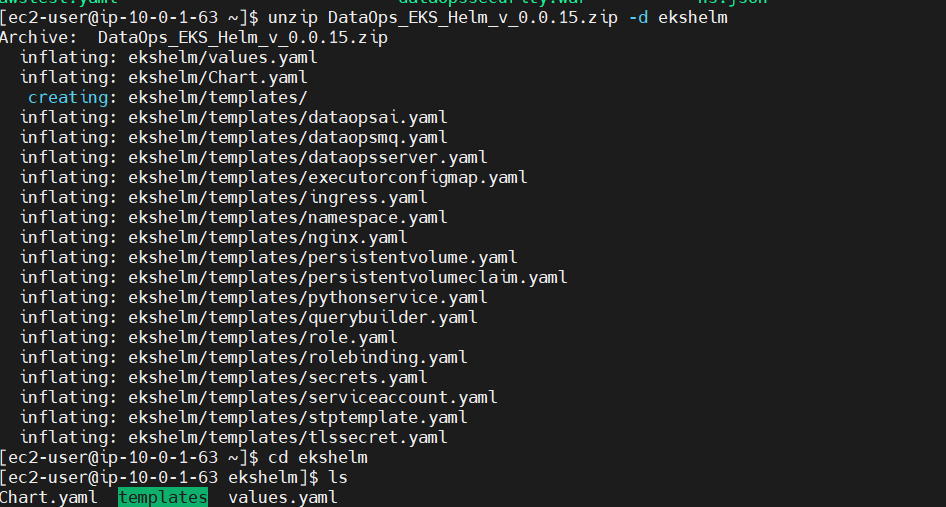
12.2.Change to the newly created directory and make sure to have all the required templates in the templates folder

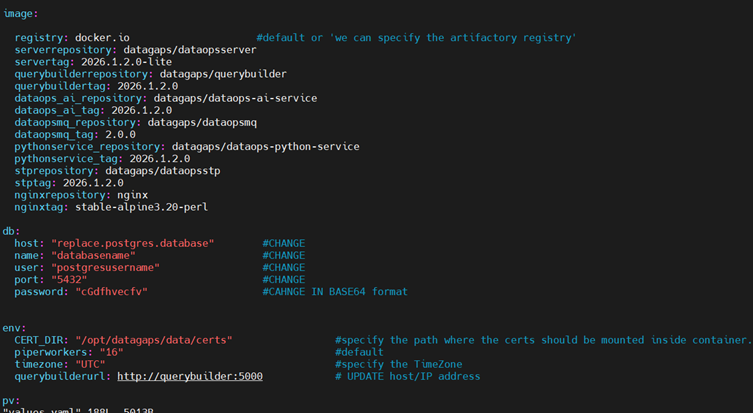
12.3.Open values.yaml file and make the changes which includes
- Image version tags should be updated to latest(reach out to datagaps support for latest tags)
- Database details configure it to dataflow database
- Namespace details and other required changes based on the requirement and save
12.4.Connect to the EKS Cluster

12.5.Now install the application with the helm by following command

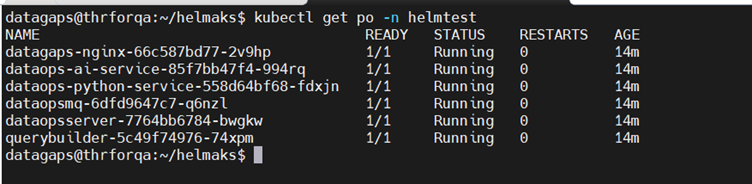
12.6.Check all the pods are running in the namespace
Check all the services are configured
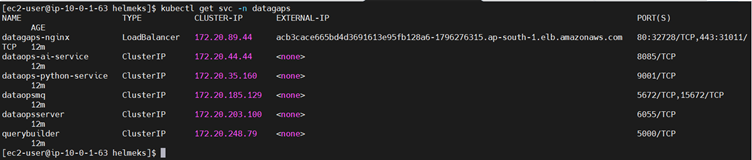
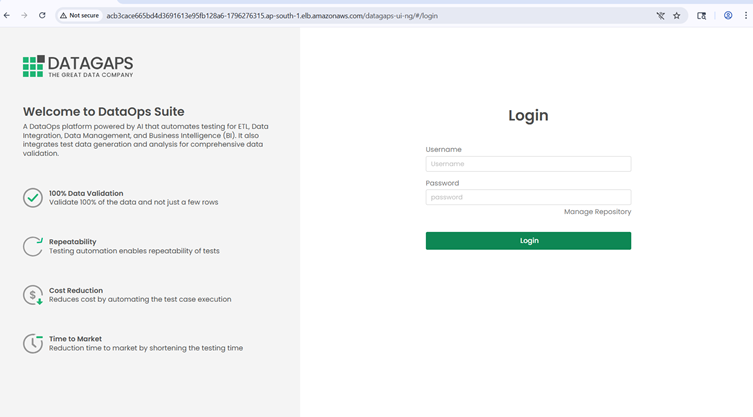
12.7.Access the DataOpsSuite Appplication using the external IP
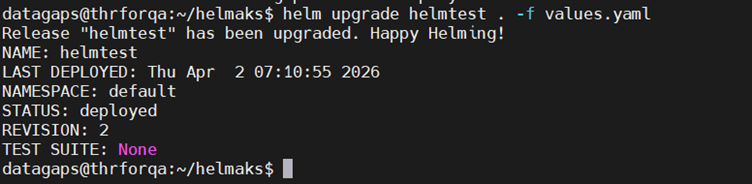
12.8.If any changes are made in the values file after installation we can upgrade by executing the below command
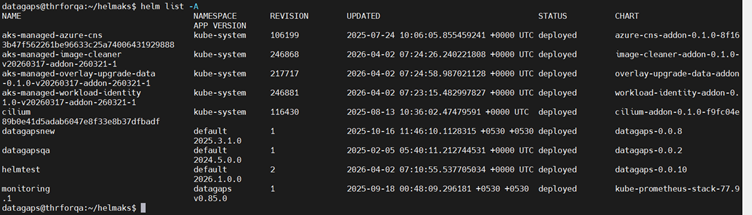
Helpful Helm Commands:
helm uninstall <release name> -- To uninstall the release (it will delete entire release(pods and everything ))
13. Post installation checks:
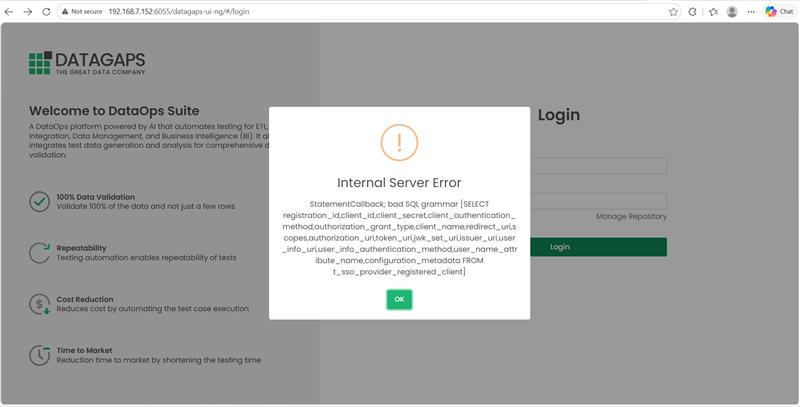
- When dataops application is integrated with empty database - it will give error pop up like above when we are accessing the application UI
- we need to run the upgrade on the empty database to load the required tables to start using the application.
- DB credentials are required for authentication.
- On the login screen, click Manage Repository above the Login button.
- You will be redirected to the Manage Repository screen. Enter the DB username and password and select the Upgrade radio button.
- Click Next to authenticate.
- Click Next again to proceed to the Upgrade screen.
- Proceed with the database upgrade and download the upgrade log once completed.
- Once the upgrade is completed, log in using the default credentialsUsername: dataops-user; Password: admin
- After logging in, apply the license and proceed with the remaining configuration.
14. Maintenance Requirement
Restart the DataOpsServer pod when upgrade is completed for the /maintenance procedure.
15. Initial Application Configuration
After the database upgrade and initial login, complete the following configuration steps:
1. Click the Configure button in the left-side menu.
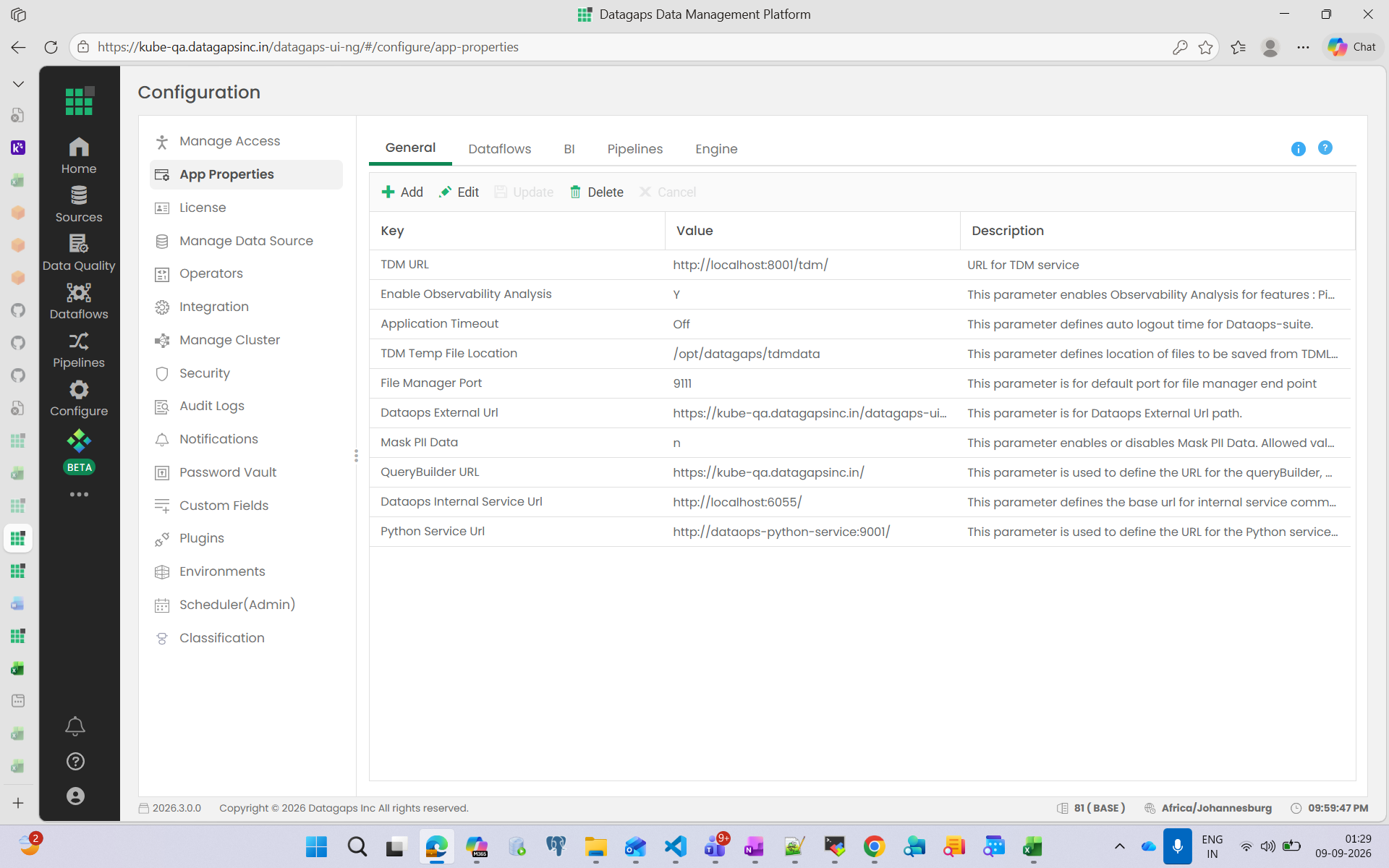
2. Open App Properties and edit the QueryBuilder URL. Update it to the application URL if nginx is deployed through helm Nginx; otherwise expose the Querybuilder service URL externally with an additional domain name and configure it.
3. Edit Python Service URL and set it to http://dataops-python-service:9001/.
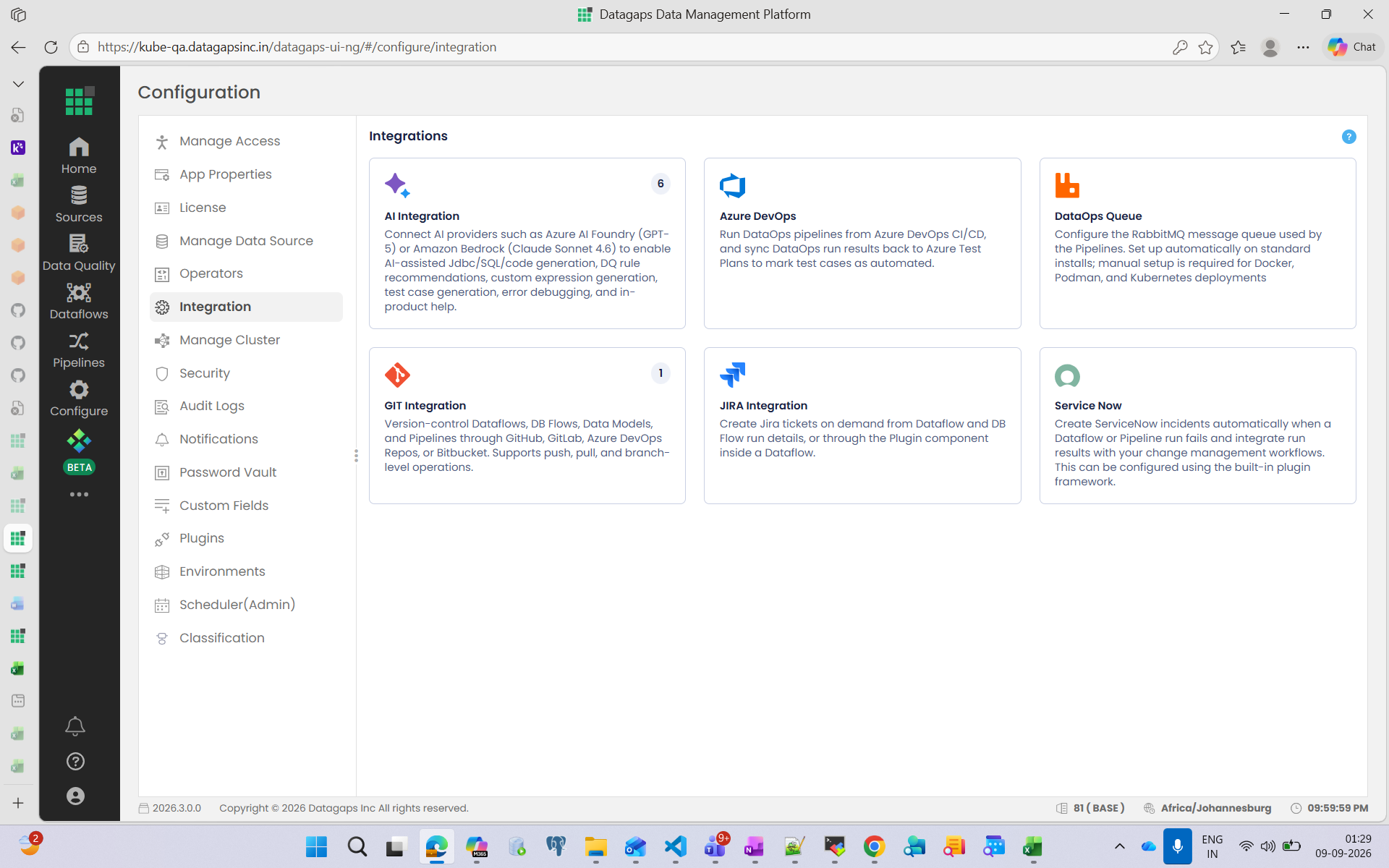
4. Open the Integration section below App Properties.
5. Select DataOpsQueue, update the hostname to dataopsmq, then test, validate, and save the configuration.
Reference:
13. Architecture Summary
The recommended Amazon EKS architecture isolates DataOps application and Spark workloads through a dedicated namespace and dedicated node groups. Amazon EFS provides the shared persistent filesystem required across potentially different EKS nodes, while Amazon RDS for PostgreSQL provides managed persistence for the DataOps application databases. The platform can connect to AWS, external, and on-premises data sources according to customer configuration.
